
Google Consent Mode
Google Consent Mode enables web and app developers to modify the behavior of Google tags and SDKs based on users' consent preferences. When implemented, it allows Google services such as Google Analytics, Google Ads, Floodlight, and Conversion Linker to dynamically adjust their functionality in response to consent signals. This is achieved through defined consent types, which control specific aspects of how each product behaves depending on the user's choices.
GCM is supported on Android Mobile, Android TV, and Fire TV.
Consent types include:
| Consent type | Description | Consent statuses |
|---|---|---|
| analytics_storage | Enables storage, such as cookies (web) or device identifiers (apps), related to analytics, for example, visit duration. | granted | denied |
| ad_storage | Enables storage, such as cookies (web) or device identifiers (apps), related to advertising. | granted | denied |
| ad_user_data | Sets consent for sending user data to Google for online advertising purposes. | granted | denied |
| ad_personalization | Sets consent for personalized advertising. | granted | denied |
For more information, see Google's documentation here: About consent mode
Setting up Google Consent Mode (GCM) for Android
-
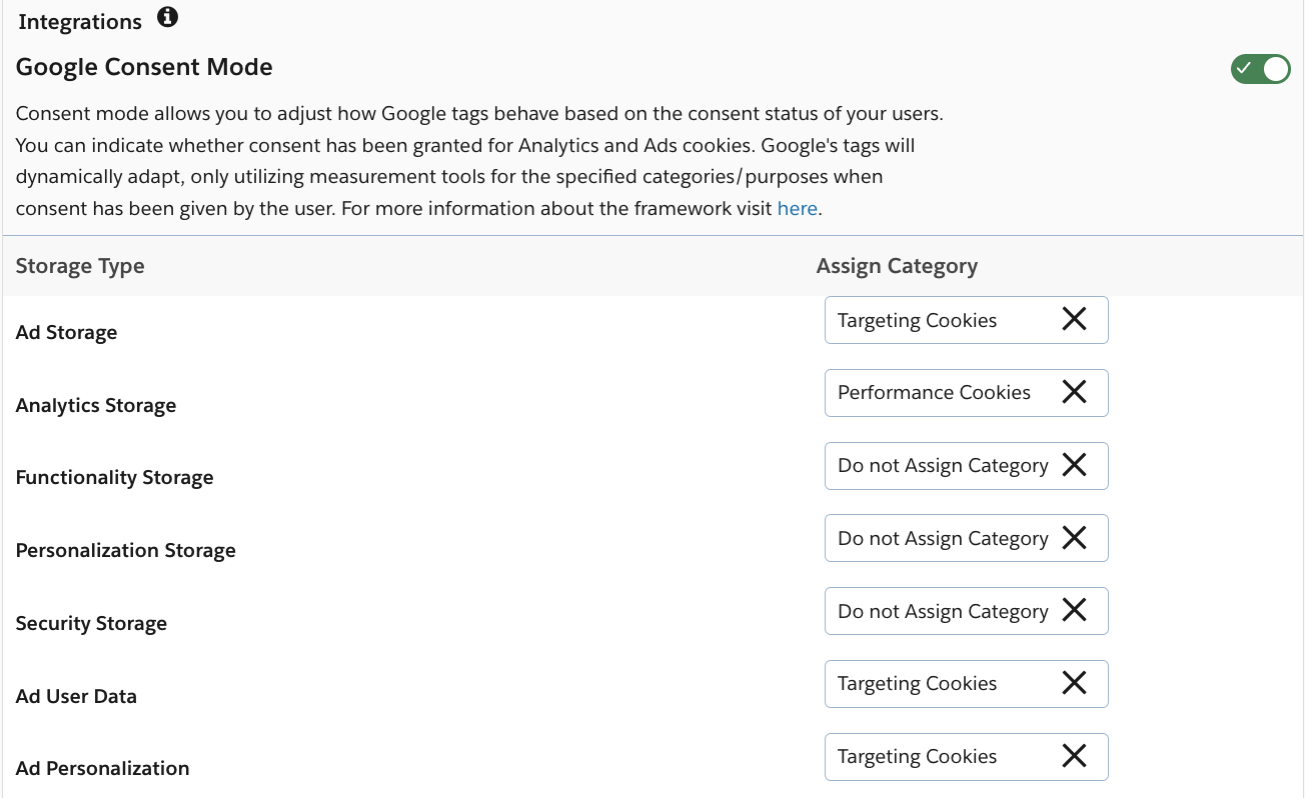
Enable Google Consent Mode in your geolocation rules and map categories from the OneTrust CMP to Google storage types.
-
-
Ensure the supported Google products (e.g. Firebase) have been installed on the app already.
-
Set default values for Consent Mode in your
AndroidManifest.xml. Value can be set to true or false.<meta-data android:name="google_analytics_default_allow_analytics_storage" android:value="true" /> <meta-data android:name="google_analytics_default_allow_ad_storage" android:value="true" /> <meta-data android:name="google_analytics_default_allow_ad_user_data" android:value="true" /> <meta-data android:name="google_analytics_default_allow_ad_personalization_signals" android:value="true" />
Decision PointFor SDK versions 202512.1.0+, see this section for next steps.
For SDK versions <202512.1.0, continue with the steps below.
- Query for Google Consent Mode consent statuses from the OneTrust SDK.
getOTGoogleConsentModeData()will return an object containing the current status and values for each of the Google Consent types based on the mapping done in Step 1.
new OTPublishersHeadlessSDK(MainActivity.this).getOTGoogleConsentModeData();| Status type | Description |
|---|---|
| NOT_INITIALIZED | Application calls method before a successful SDK initialization (at least once). Consent has not been collected. |
| NOT_CONSENTED | Application calls method before user interacts with and dismisses the banner. Consent has not been collected. |
| CONSENT_GIVEN | Application calls method after user has interacted with the banner. Consent has been collected. |
| Consent type | Description |
|---|---|
| UNASSIGNED | 'Do not Assign Category' was mapped to this storage/consent type in the geolocation rules. |
| UNDEFINED | The SDK was not initialized successfully at least once, data was not fetched, or the mapped category does not exist (no SDKs assigned). |
| DENIED | Consent is rejected/withdrawn for the associated category. |
| GRANTED | Consent is given/provided to associated category. |
Sample Response:
//consent interaction status
OTGoogleConsentModeData(
sdkStatus=CONSENT_GIVEN,

//consent value of each storage type
consentType=OTGoogleConsentType(
analyticsStorage=GRANTED,
adStorage=GRANTED,
adUserData=GRANTED,
adPersonalization=GRANTED)) - Update the desired Google library from the consent retrieved in Step 4 with the
setConsent()public method from Google.
// Set consent types.
Map<ConsentType, ConsentStatus> consentMap = new EnumMap<>(ConsentType.class);
consentMap.put(ConsentType.ANALYTICS_STORAGE, ConsentStatus.GRANTED);
consentMap.put(ConsentType.AD_STORAGE, ConsentStatus.GRANTED);
consentMap.put(ConsentType.AD_USER_DATA, ConsentStatus.GRANTED);
consentMap.put(ConsentType.AD_PERSONALIZATION, ConsentStatus.GRANTED);

mFirebaseAnalytics.setConsent(consentMap);
As the application will need to retrieve the consents for each Consent type and set it in the Google library as indicated in steps 4 and 5, OneTrust has written a couple of functions to assist with and simplify the process:
-
These two functions will retrieve the Google Consent Mode consents from the OneTrust SDK and set the status in the associated Google product.
private void setConsentToGoogleAnalytics() { OTGoogleConsentModeData otGoogleConsentModeData = new OTPublishersHeadlessSDK(MainActivity.this).getOTGoogleConsentModeData(); Map<FirebaseAnalytics.ConsentType, FirebaseAnalytics.ConsentStatus> consentMap = new EnumMap<>(FirebaseAnalytics.ConsentType.class); consentMap.put(FirebaseAnalytics.ConsentType.ANALYTICS_STORAGE, getAnalyticsConsentStatus(otGoogleConsentModeData.getConsentType().getAnalyticsStorage())); consentMap.put(FirebaseAnalytics.ConsentType.AD_STORAGE, getAnalyticsConsentStatus(otGoogleConsentModeData.getConsentType().getAdStorage())); consentMap.put(FirebaseAnalytics.ConsentType.AD_USER_DATA, getAnalyticsConsentStatus(otGoogleConsentModeData.getConsentType().getAdUserData())); consentMap.put(FirebaseAnalytics.ConsentType.AD_PERSONALIZATION, getAnalyticsConsentStatus(otGoogleConsentModeData.getConsentType().getAdPersonalization())); mFirebaseAnalytics.setConsent(consentMap); } private static FirebaseAnalytics.ConsentStatus getAnalyticsConsentStatus(OTGCMConsentStatus consentStatus) { FirebaseAnalytics.ConsentStatus fbTypeConsentStatus = FirebaseAnalytics.ConsentStatus.DENIED; if (consentStatus == OTGCMConsentStatus.GRANTED) { fbTypeConsentStatus = FirebaseAnalytics.ConsentStatus.GRANTED; } return fbTypeConsentStatus; } -
OneTrust recommends calling the
setConsentToGoogleAnalytics()function above when theOTConsentUpdatedbroadcast is triggered.OTConsentUpdatedis triggered every time any OneTrust UI is dismissed and consent has been updated locally. More info on that method here.registerReceiver(OTConsentUpdated, new IntentFilter("OTConsentUpdated")); BroadcastReceiver OTConsentUpdated = new BroadcastReceiver() { setConsentToGoogleAnalytics(); };
For more information regarding consent mode setup, see Set up consent mode for apps.
202512.1.0+ SDK
As of 202512.1.0, the OneTrust SDK automatically synchronizes user consent preferences with the Firebase Analytics SDK without additional code from the app.
- Complete Steps 1 - 3 above
- Add the following rule to your ProGuard configuration to ensure the OneTrust SDK can access enums and prevent them from being obfuscated.
-keep class com.google.firebase.analytics.FirebaseAnalytics { *; }
-keepclassmembers enum * {
    <fields>;
}- (Optional) Enable Firebase Analytics debug logging and print consent logs to logcat.
adb shell setprop log.tag.FA VERBOSE
adb shell setprop log.tag.FA-SVC VERBOSE
adb logcat -v time -s FA FA-SVC
Once the setup is complete, the OneTrust SDK will:
- Detect if Firebase is present in the app
- Automatically invoke setConsent() for each supported and mapped consent type
For details on the setConsent() method, refer to Google’s documentation.
Verifying consent settings
You can verify that your consent settings are working as intended by viewing the log messages for your app.
- Enable verbose logging on your device.
- In the Android Studio logcat, find the log message that starts with
Setting consent. For example, if Ad storage is enabled, you'll see the following log message:Setting consent, ... AD_STORAGE=granted
Google Consent Mode for IAB TCF
Applications can be configured to instruct Google to interpret the IAB TC String in order to determine consent values for the following Consent Mode settings:
| ad_storage |
| ad_personalization |
| ad_user_data |
In the OneTrust platform, enable the Google Consent Mode toggle in geolocation rules using the IAB TCF template. When this configuration is enabled, the SDK will write the key IABTCF_EnableAdvertiserConsentMode to local storage and allows Google to automatically adjust its signal behavior according to TC String consents.
| Key | value | Description |
|---|---|---|
| IABTCF_EnableAdvertiserConsentMode | 1 | Indicates GCM is enabled for TCF |
| IABTCF_EnableAdvertiserConsentMode | 0 | Indicates GCM is disabled for TCF |
Google Consent Mode storage types are mapped to TCF purposes as follows:
| Purpose | Description | Google behavior when Purpose is denied |
|---|---|---|
| 1 | Store and/or access information on a device. | ad_storage = denied ad_user_data = denied |
| 3 | Create a personalised ads profile | ad_personalization = denied |
| 4 | Select personalized ads | ad_personalization = denied |
For more information about IAB TCF integration behavior with GCM, see Google's documentation Enable consent mode TCF integration.
Updated 10 months ago